

SMM Panel API for Resellers: Guide to Easy Integration


Running an SMM reseller business becomes much easier when orders can move automatically from your website to a service provider. An SMM panel API for resellers creates that connection, allowing a reseller website, application, or custom system to communicate with an SMM panel without manually processing every order.
For anyone planning to build a scalable reseller operation, understanding APIs is important because automation affects order speed, pricing, service synchronization, and overall efficiency. This guide explains how the system works, what you need before integration, how to choose a provider, and how API automation can support a reseller business.
- What Is an SMM Panel API?
- How SMM Panel API Works for Resellers
- Why Resellers Need API Integration
- What You Need Before Integrating an SMM Panel API
- How to Integrate SMM Panel API Step by Step
- SMM Panel API v2 Integration Explained
- SMM API Integration With Website
- How to Build an SMM Panel Reseller Setup
- How to Choose an SMM Panel API Provider for Resellers
- Cheap SMM Panel API for Resellers: Is Lower Price Better?
- SMM Panel Wholesale API and Pricing Strategy
- SMM Panel API Automation and Order Management
- Common API Integration Mistakes Resellers Should Avoid
- SMM Panel API Documentation: What Should It Include?
- Is an API Necessary for Every Reseller?
- Final Checklist Before Launching Your Reseller API
- Conclusion
- Frequently Asked Questions
What Is an SMM Panel API?
An API, or Application Programming Interface, allows two different software systems to communicate with each other. In an SMM reseller business, it usually connects your customer-facing website or panel with an upstream service provider.
For example, imagine a customer purchases an Instagram service from your website. Instead of manually logging into another panel and placing that order, your system can send the required information through the API. The provider receives the request and returns information such as an order ID or status. This is the basic idea behind an SMM reseller API.
A typical integration can allow your system to:
- Retrieve available services
- Display service prices
- Submit customer orders
- Check order status
- Check account balance
- Process supported refills or cancellations
- Synchronize service information
- Automate order forwarding
The exact features depend on the provider and its documentation, so resellers should always check the available API methods before starting development. If you are still learning how the reseller model works, an understanding of what is an SMM reseller panel can provide useful background before moving into API integration.
How SMM Panel API Works for Resellers
The easiest way to understand an API is to look at the order journey from beginning to end. A customer first visits your reseller website and selects a service. Your website collects the required information, such as the service ID, target URL, and quantity.
Your backend then sends that information to the connected provider through the API. The provider processes the request and sends a response back to your system. Your website can then display the order status to the customer.
The process generally looks like this:
Customer → Reseller Website → API → Provider Panel → API Response → Reseller Website → Customer
This simple flow eliminates much of the repetitive work associated with manual order processing. The next important part is understanding which components are involved in this connection.
Main Components of an API Connection
An API integration normally involves several important elements:
| Component | Purpose |
|---|---|
| API URL | The address used to communicate with the provider |
| API key | Identifies and authorizes the reseller account |
| Service ID | Identifies the selected service |
| Order parameters | Contains information required to create an order |
| Response | Provides order IDs, status, errors, or other information |
| Database | Stores customer and order information |
| Backend | Handles communication between your website and provider |
Different providers can use different formats, parameters, authentication methods, and API versions. Therefore, copying an integration from one provider to another may require adjustments.
Why Resellers Need API Integration
Manual order processing might seem manageable when you have only a few customers. However, as the number of orders increases, manually copying information becomes inefficient and increases the possibility of mistakes.
SMM panel API integration helps create a more automated workflow. Instead of an employee checking every new order, the website can forward eligible orders automatically. The biggest advantage is consistency. Every order can follow the same predefined workflow, reducing repetitive tasks and making it easier to handle a larger number of orders.
Automation can also improve response time. A customer does not necessarily need to wait for someone to notice the order and manually submit it. For businesses that are researching how does a reseller SMM panel work, API connectivity is one of the most important technical concepts to understand.
What You Need Before Integrating an SMM Panel API
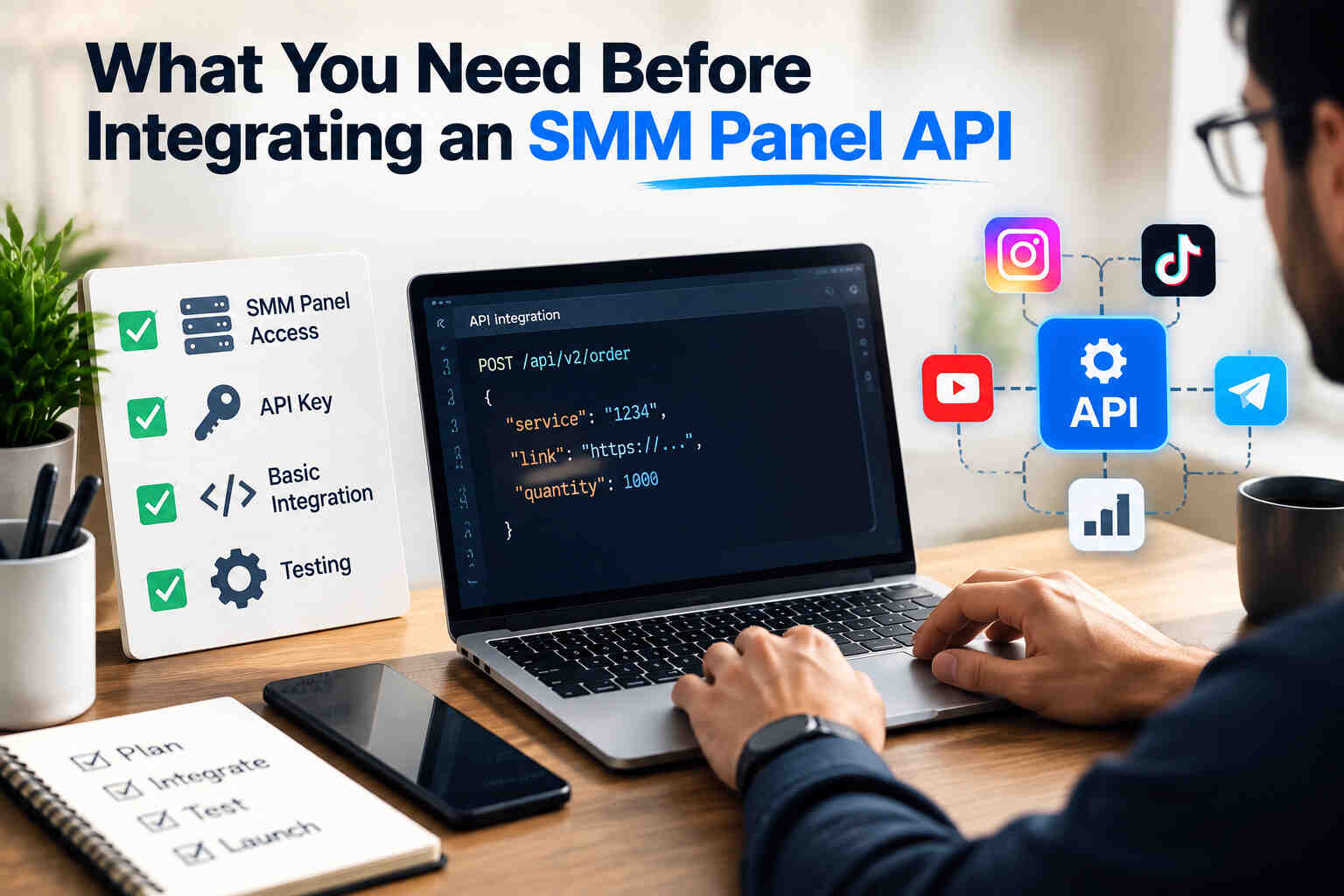
Before starting development, prepare the basic information required by the provider. A good setup begins with documentation rather than immediately writing code.
API Access
You first need an account with an API-enabled provider. The provider should give you an API endpoint and authentication credentials. Some providers include API access as part of their reseller account, while others may have different access conditions.
SMM Panel API Key
The SMM panel API key works like an authentication credential. Your system uses it to identify your account when communicating with the provider. Treat the key as confidential information.
It should not be placed directly into public frontend JavaScript, public repositories, screenshots, or other locations where unauthorized users could access it. For production systems, storing sensitive credentials on the server side is a safer approach.
API Documentation
Good SMM panel API documentation should explain the available operations, required parameters, response formats, authentication process, and possible errors. Before choosing a provider, read the documentation carefully. A provider with a clear API reference can save considerable development time later.
How to Integrate SMM Panel API Step by Step
The technical implementation depends on your software, but the overall process is relatively straightforward.
1. Choose an API Provider
Start by evaluating providers based on reliability, documentation, service availability, pricing, support, and API stability. Do not select a provider simply because it offers the cheapest rate. A low wholesale price does not automatically mean a better business opportunity.
2. Get Your API Credentials
After creating the appropriate account, locate the API section in the provider dashboard. You will typically receive an API URL and an API key. Keep both available for backend configuration.
3. Read the API Documentation
The next step in how to integrate SMM panel API is understanding the request and response structure.
Look for information about:
- Authentication
- Service listing
- Order creation
- Order status
- Balance checking
- Refills
- Cancellations
- Error responses
- Rate limits
- Supported parameters
Never assume that every provider uses exactly the same API structure.
4. Connect the Service List
Your reseller website needs to know what services the provider offers. The API may return information such as service ID, name, category, price, minimum quantity, maximum quantity, and other service-specific fields. Your system can then map those services to the products displayed on your website.
5. Connect Order Processing
Once a customer places an order, your backend sends the required parameters to the provider. A simplified workflow looks like: Customer order → Payment confirmation → Service validation → API request → Provider order ID → Database update The returned order ID should be stored so your system can track the order later.
6. Connect Status Checking
Creating an order is only one part of the integration. Your website also needs to know what happens after the order is submitted. Depending on the provider, status information may be retrieved through repeated API requests or another supported mechanism. Your database should associate the provider's order ID with your internal order ID.
7. Test Before Launching
Never move directly from development to production without testing. Create test scenarios for successful orders, invalid service IDs, incorrect quantities, insufficient balance, invalid links, duplicate requests, and provider errors. This stage helps identify problems before real customers encounter them.
SMM Panel API v2 Integration Explained
SMM panel API v2 integration is commonly associated with the standardized reseller API pattern used by many SMM systems. However, the term “v2” should not be treated as a guarantee that every provider implements exactly the same features.
Providers can customize their endpoints, parameters, supported actions, and response structures. Before integrating, compare the provider's actual documentation with your software's requirements.
A useful compatibility checklist includes:
| Requirement | What to Check |
|---|---|
| Endpoint | Is the API URL clearly documented? |
| Authentication | How is the API key sent? |
| Services | Can your system retrieve the service catalog? |
| Orders | Can orders be submitted programmatically? |
| Status | Can your system track order progress? |
| Balance | Can your software check available funds? |
| Refills | Are supported refill functions documented? |
| Errors | Are error responses clearly explained? |
| Limits | Are request limits specified? |
This simple checklist can prevent compatibility problems later.
SMM API Integration With Website
An SMM API integration with website generally requires a backend layer between your customer interface and the provider. The customer should not directly communicate with the provider using your private API credentials. Instead, the frontend sends an order request to your own server, and the server communicates with the external API.
A simplified architecture is:
Website frontend → Your backend → Provider API → Provider response → Your backend → Website
This architecture also gives you more control over pricing, validation, logging, customer accounts, and order management. For example, your website may display a retail price that is different from the provider's wholesale price. Your backend can calculate the appropriate customer price before showing the service.
How to Build an SMM Panel Reseller Setup
A complete SMM panel reseller setup involves more than simply connecting an API. You also need a customer-facing interface, user accounts, payment processing, order management, service categorization, pricing rules, and support processes.
A basic reseller system can include:
- Customer registration
- Wallet or payment system
- Service catalog
- Order form
- API connection
- Order tracking
- Pricing and markup rules
- Admin dashboard
- Transaction records
- Error and activity logs
The API acts as the communication bridge, while the rest of the platform manages the customer experience.
How to Choose an SMM Panel API Provider for Resellers
Choosing the right SMM panel API provider for resellers requires looking beyond price. A provider may advertise very low rates, but frequent downtime, unclear documentation, unstable services, or poor support can create problems for your business.
API Reliability
Your reseller website depends on the provider's API. If the API becomes unavailable frequently, your customers may experience delayed or failed orders.
Service Quality
Wholesale pricing only matters if the services are suitable for your customers and consistently available.
Documentation
Clear documentation makes integration and troubleshooting much easier.
Support
Technical questions can arise during integration, especially when parameters or response formats change. Responsive support can reduce downtime.
Pricing Stability
Constant price changes can make it difficult to maintain your retail pricing. Look for a provider whose pricing model is reasonably predictable.
Cheap SMM Panel API for Resellers: Is Lower Price Better?
Searching for a cheap SMM panel API for resellers is understandable because wholesale cost directly affects potential margins. However, price should be only one part of the decision.
Suppose Provider A offers a lower rate but frequently changes services or experiences downtime. Provider B costs slightly more but provides better documentation, stable service availability, and predictable processing. The second provider may be more useful for a long-term reseller business.
A practical evaluation should consider:
Total business value = service cost + reliability + support + automation capability + operational risk This approach is more useful than comparing wholesale prices alone.
SMM Panel Wholesale API and Pricing Strategy

An SMM panel wholesale API allows resellers to purchase or access services at provider-level pricing and then create their own retail pricing structure.
For example, assume a provider charges you $2 for a particular service. You might establish a retail price of $3 depending on your operating costs and desired margin.
However, your actual profit should account for payment fees, refunds, discounts, currency conversion, hosting, development, customer support, and other expenses.
This means revenue and profit are not the same thing.
A simple formula is:
Gross margin = Customer revenue − Provider cost
And a broader business calculation is:
Net profit = Gross margin − Operating expenses
Understanding this difference is important when planning to start an SMM panel reseller business.
SMM Panel API Automation and Order Management
SMM panel API automation becomes especially valuable when your order volume increases.
Instead of manually checking new orders throughout the day, your system can automatically perform predefined actions.
For example:
New order → Validation → API submission → Provider order ID → Status synchronization → Customer notification
This workflow can run continuously as long as your systems and provider remain available.
Automated SMM Order Processing
The goal of automated SMM order processing is not simply to submit orders faster. A well-designed system should also handle errors and maintain accurate records.
Your system should be able to recognize situations such as:
- Invalid service
- Invalid quantity
- Insufficient provider balance
- API timeout
- Temporary provider failure
- Duplicate order submission
- Unexpected API response
Instead of treating every response as successful, the software should validate the provider response before marking an order as completed or accepted.
Common API Integration Mistakes Resellers Should Avoid
Even a simple API can cause serious problems when implemented carelessly.
Exposing the API Key
Never place private API credentials in frontend code. If customers can inspect the page and see the key, they may be able to misuse the account.
Ignoring API Errors
A request returning an HTTP response does not necessarily mean the order was successfully accepted. Your system should inspect the actual response and error information.
Failing to Store Order IDs
Provider order IDs are essential for tracking. Store them alongside your internal order IDs.
Sending Too Many Requests
Repeatedly requesting the same information can increase server load and potentially trigger provider limits. Cache information such as service catalogs where appropriate.
Not Testing Edge Cases
Successful orders are only one scenario. Test failed payments, invalid parameters, unavailable services, API downtime, and duplicate requests.
SMM Panel API Documentation: What Should It Include?
Before committing to a provider, check whether its documentation answers the questions developers actually need.
Good documentation should clearly explain:
- API endpoint
- Authentication method
- Request method
- Parameters
- Required and optional fields
- Response examples
- Error messages
- Order statuses
- Service information
- Balance requests
- Supported order operations
- Rate limits
- Version information
Clear documentation reduces development time and makes future maintenance easier.
Is an API Necessary for Every Reseller?
Someone who places only a small number of orders manually may not need an API immediately. An API becomes much more valuable when you have your own website, multiple customers, frequent orders, a custom application, or a larger reseller operation.
If your goal is scalability, however, API integration is one of the most useful technical foundations to consider. For resellers interested in expanding beyond a single platform, services such as SMM services for influencers can also illustrate how different customer segments may use social media services.
Final Checklist Before Launching Your Reseller API
Before making the system available to customers, review the following:
| Area | Ready? |
|---|---|
| API credentials secured | ✓ |
| API documentation reviewed | ✓ |
| Service mapping completed | ✓ |
| Order submission tested | ✓ |
| Status synchronization tested | ✓ |
| Error handling implemented | ✓ |
| Provider balance monitoring configured | ✓ |
| Customer pricing configured | ✓ |
| Order IDs stored correctly | ✓ |
| Backup and logging available | ✓ |
A structured launch checklist can prevent small technical mistakes from becoming larger customer-service problems.
Conclusion
An API can transform a basic reseller website into a more structured and scalable ordering system. Instead of manually transferring every customer order, the API creates a communication bridge between your platform and the service provider.
The most important areas are reliable documentation, secure API-key management, correct service mapping, accurate order tracking, proper error handling, and a provider that fits your business requirements. Price matters, but reliability and long-term operational stability matter just as much.
For anyone planning to build or improve an SMM panel API for resellers, the best approach is to start with a clear workflow, test every major API function, and design the system so that automation improves both efficiency and customer experience.
Frequently Asked Questions
1. What is an SMM panel API for resellers?
It is a software interface that allows a reseller website, application, or panel to communicate with an SMM service provider programmatically. It can be used for service retrieval, order submission, status tracking, and other supported operations.
2. How does an SMM panel API work?
The reseller's system sends an authenticated request to the provider's API. The provider processes the request and returns information such as an order ID, status, service data, balance information, or an error response.
3. What is an SMM panel API key?
An API key is a credential used to identify and authorize the reseller's API requests. It should be treated as confidential and stored securely on the server.
4. How do I integrate an SMM panel API?
Start by obtaining API access, reviewing the provider's documentation, configuring the API endpoint and credentials, connecting the service catalog, implementing order creation, adding status tracking, and thoroughly testing the integration.
5. Is SMM panel API v2 compatible with every reseller panel?
Not necessarily. Many providers follow similar API conventions, but parameters, authentication, supported actions, and response formats can differ. Always compare the provider documentation with your software requirements.
6. What should I consider when choosing an API provider?
Consider API reliability, service availability, documentation quality, pricing, support, response consistency, supported features, and the provider's ability to handle your expected order volume.
7. Can API integration automate a reseller business?
Yes. API integration can automate many repetitive technical processes, including service synchronization, order forwarding, status checking, and supported order actions. However, payment processing, customer support, pricing, and business management still require proper systems and oversight.

Recently Posted Blogs

Benefits of Using an SMM Panel for Social Media Growth
In the digital era, social media has become one of the most powerful tools for creators, influencers, and businesses to build their brands and reach global audiences. However, standing out on crowded platforms like Instagram, YouTube, TikTok, and Twitter [...]

How Does an SMM Panel Work? A Step-by-Step Breakdown
Social media presence is the most essential and the strongest tool for businesses, influencers, and even regular users who want to grow their presence online. Whether it’s Instagram, Facebook, TikTok, Twitter (X), or YouTube, everyone is competing for attention. But standing out in this crowded space is not easy all the time. [...]

What is an SMM Panel? A Complete Beginner’s Guide (2026)
In the world of digitalization, social media is not an option for businesses but an essential. If you run a small online store, a local business, or a personal brand, your growth and success depend heavily on your online visibility. However, your growth on platforms such as Facebook, Instagram, TikTok, YouTube, and [...]